Check Off Club
30-Day Self-Care Challenge — free printable PDF
Routines & Self-Care

30-Day Self-Care Challenge

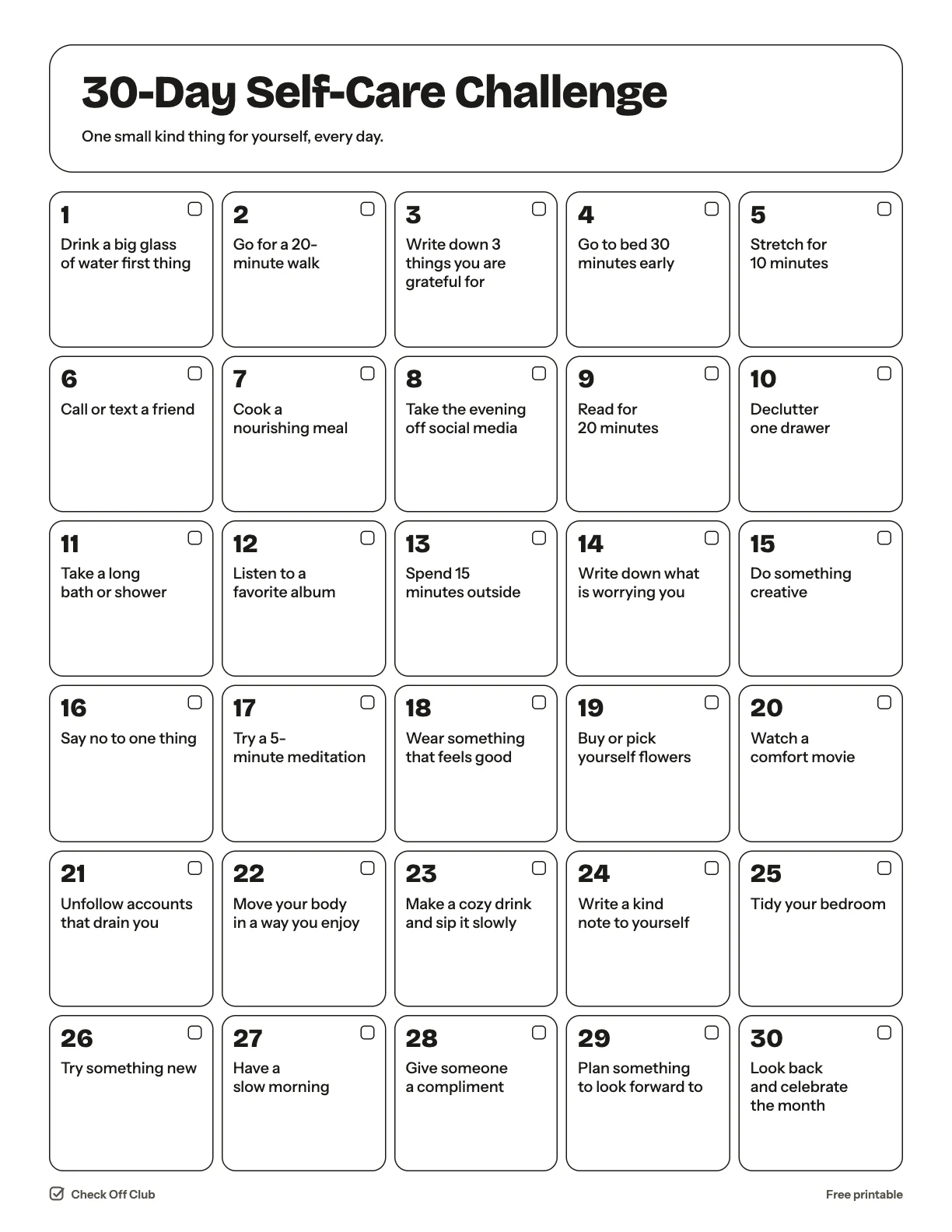
Self-care does not need a spa day. This challenge gives you one small, free or nearly free thing to do each day for 30 days — most take less than 20 minutes.

Paper
Edit it before printing — change any text, type on the lines, pick your own color
  • Free, no sign-up
  • 1 page
  • White paper by default, color optional
Save to Pinterest

How to use it

  1. Do the days in any order. Pick the one that fits your energy today.
  2. Swap out anything that does not suit you and write your own idea in the box.
  3. On day 30, circle the three ideas you liked most and keep them as weekly habits.
What is on the 30-day self-care challenge

  1. Drink a big glass of water first thing
  2. Go for a 20-minute walk
  3. Write down 3 things you are grateful for
  4. Go to bed 30 minutes early
  5. Stretch for 10 minutes
  6. Call or text a friend
  7. Cook a nourishing meal
  8. Take the evening off social media
  9. Read for 20 minutes
  10. Declutter one drawer
  11. Take a long bath or shower
  12. Listen to a favorite album
  13. Spend 15 minutes outside
  14. Write down what is worrying you
  15. Do something creative
  16. Say no to one thing
  17. Try a 5-minute meditation
  18. Wear something that feels good
  19. Buy or pick yourself flowers
  20. Watch a comfort movie
  21. Unfollow accounts that drain you
  22. Move your body in a way you enjoy
  23. Make a cozy drink and sip it slowly
  24. Write a kind note to yourself
  25. Tidy your bedroom
  26. Try something new
  27. Have a slow morning
  28. Give someone a compliment
  29. Plan something to look forward to
  30. Look back and celebrate the month

Questions

Is this printable really free?

Yes. The 30-Day Self-Care Challenge is free to download and print for personal, family and classroom use. There is no sign-up and no email required.

Which size should I download — US Letter or A4?

Choose US Letter (8.5 × 11 in) if you are in the United States or Canada, and A4 (210 × 297 mm) almost everywhere else. Both files have the same content.

How do I print it?

Open the PDF and print at 100% or "actual size" on plain paper. The default version is white with thin outlines, so it uses very little ink. If you want color, switch Paper to Color before downloading, or pick any color in the editable version.

Can I edit it before printing?

Yes. Use "Edit it before printing" on this page to open the editable version. Click any text to change it, type on the blank lines, tick boxes, then print it or save it as a PDF. Your changes are kept in your browser only.

Can I use it on a tablet instead of printing?

Yes. Import the PDF into GoodNotes, Notability or any PDF annotation app and write on it with a stylus.